Obtain battle pet Razeshi C for Midnight by doing a quest — on Discord?
 @flanageddon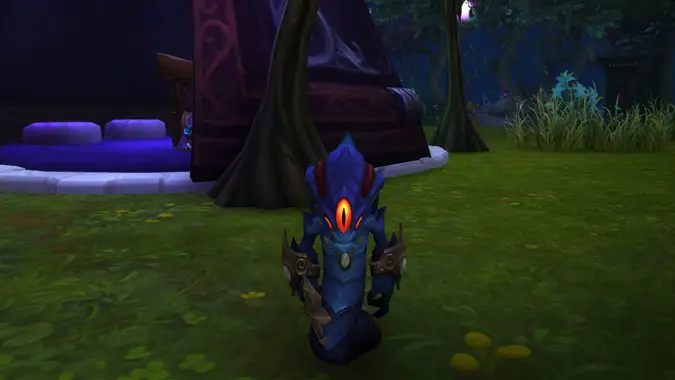
Discord is offering a brand new battle pet, Razeshi C., and you can obtain it simply by having Discord open while playing World of Warcraft: Midnight. Unlike most quests that Discord offers, this one does not automatically pop up on the application — instead you do need to track it down.
To begin your quest, first you need to go into the Direct Messages tab — it looks like the Discord logo and is typically the very top of your channel selection — and find the subtab marked Quests. From there, scroll until you see the quest for World of Warcraft and click accept. Now all you need to do is leave Discord open and play Midnight — and it does specify the Midnight era of WoW — for 15 minutes. The timer starts counting as soon as you log in so by the time you finish customizing your new Haranir, you may already unlocked this adorable little void Naga.
Once the quest is complete in Discord, you will gain a redemption code to use in the Battle.net launcher under Redeem Code — located where you click your username on the upper righthand side of the Battle.net launcher. Razeshi C. will be available in your pets tab the next time you log in, all ready to follow you into the Voidstorm.
Note that, despite the change to wild pet taming in Midnight, Razeshi C. is in fact a battle pet, with a full suite of abilities for combat. As you might expect for a little Naga, he is a Humanoid, with a smattering of Humanoid, Magic, and Aquatic abilities.
This promotion ends in two weeks on March 15 and you only have until April 14 to redeem the code once you obtain it, so act now and be rewarded for what a lot of players are doing already: being on Discord while playing WoW.
Please consider supporting our Patreon!
Join the Discussion
Blizzard Watch is a safe space for all readers. By leaving comments on this site you agree to follow our commenting and community guidelines.







