Accessibility is for all — yes, even in video games
Accessibility isn’t a key feature that tends to be highlighted during big gaming events like Summer Game Fest, Gamescom, or The Game Awards, which bombard us with new game trailers presented at lightning speed. But while we watch these game announcement extravaganzas and wonder which games we would personally enjoy playing, for many of us that calculus also includes the question of can I play that game?
During this summer’s seasonal showcases, the Access-Ability Summer Showcase aimed to highlight accessible games, with trailers specifically addressing accessibility features. It wasn’t the biggest showcase of the year, but it showed off important features that don’t usually get a spotlight.
Finding accessible games can be a challenge, and even defining what makes something an accessible game can be difficult, because the accommodations for one accessibility need can create new barriers for someone with a different accessibility need. One of the biggest challenges to finding accessible games is the trailers tend to be almost entirely cinematics, which by design have no UI elements or control hints visible. While that may tell you if a game has the kind of vibe you’re looking for, it doesn’t tell you how easy it will be for you to play it.
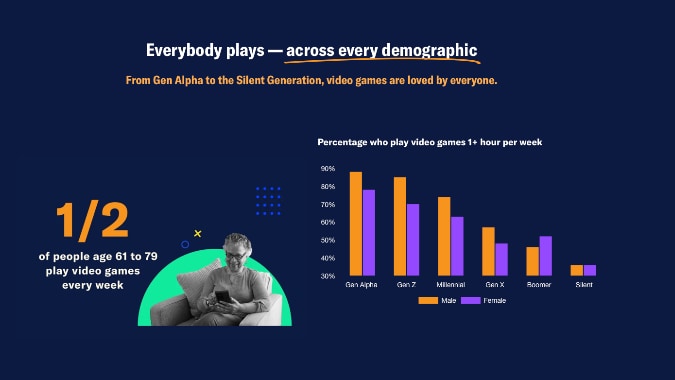
Accessible game design is important for everybody!
For game developers, strong accessibility options increases the size of their potential customer base. For players, accessibility options allows a broader choice of games they can play. While gaming is often thought of as something done by children and teens, there are many Millennial and Gen-X gamers who are getting older and experiencing more aged related impairments. If you talk to the average self-identified gamer and ask them if they intend to stop gaming when they get older their answer will be no.
Accessible design accommodates both people with permanent or progressive impairments, but also people with temporary impairments like an injury, illness… or when you just haven’t had enough sleep or are hungover. Even if you think you’ll never need to use an accessibility system, you may want to rethink that assumption if you plan to keep gaming as you age. Accessibility helps all of us.
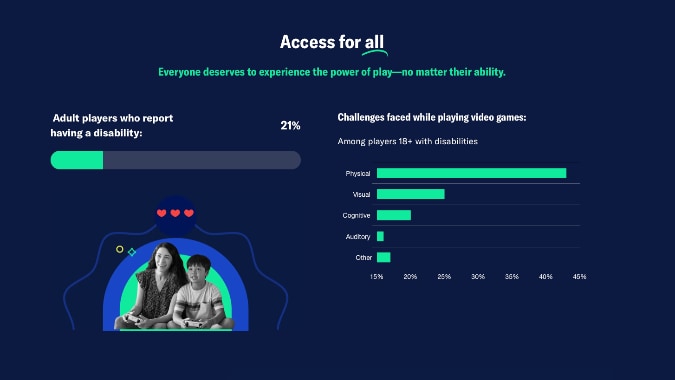
There are lots of potential accessibility barriers that can keep people from playing a game, and affordances that can help them play or adapt systems and controls to their needs. Accessibility barriers are typically grouped into the following categories:
- Physical impairments may include limited reaction times, limited flexibility, inability to generate sufficient force to activate a control, tremors, inability to activate multiple controls simultaneously, or fatigue that means a player may need frequent breaks. Affordances for issues like this would include being able to choose alternative input devices, save your game frequently and exit the game without losing progress, adjust the sensitivity of controls or remap control options, queue specific actions or sequences of actions.
- Sensory impairments may include people who are blind, partially-sighted, color-blind, deaf, hard-of-hearing, have photo-sensitive epilepsy, visually-triggered motion sickness, etc… Affordances may include subtitles, audio-descriptions, the ability to change color rendering, the ability to selectively turn off certain visual effects or sound channels, in-game radar or sonar systems for directional information.
- Cognitive, emotional, or neurodivergent impairments may include people who struggle to process information rapidly or remember information not currently on screen, get overwhelmed by large volumes of information being delivered in a short period of time, realistic violence and gore, phobia triggers like spiders. Affordances may include the ability to turn on story-mode or change the difficulty of the game to side-step timed events, in-game journals or helpers to assist with remembering key information, arachnophobia modes that replace spider sprites with alternative models, the ability to adjust the gore level of combat effects, accurate content warnings.
- Technical impairments may include access to reliable high-speed internet, or assistive devices being blocked (which some games may do to prevent cheating or botting, but can hurt everyday gamers), requiring very high product specifications that are inaccessible to the average or casual player. Affordances may include having an offline mode or LAN mode for both play and download of game clients, supporting a broad variety of hardware configurations including alternative input or output devices.
- Social and cultural barriers can make specific players feel unwelcome due to being disabled or neurodivergent, or due to their gender or sexuality, instead of any particular behavioral issues exhibited by that player. Affordances may include having monitored communication channels with clear community guidelines, limiting the ability to communicate freely in game such as restricting interplayed communication to emotes or sprays.
Some affordances to address one accessibility barrier can create issue for other players, for example audio descriptions will help a player with visual impairments, but may cause sensory or cognitive overload (or just confusion) for someone else. That’s why it’s best for designers to think about accessibility early, and plan around problems. Activating affordances should be optional to avoid conflicts, and some game concepts may not support certain accessible needs: something like a competitive high speed platformer may not be suitable for someone with manual dexterity constraints.
How can you tell if a game accommodates your accessibility needs?
Sadly most game trailers don’t demonstrate their accessibility features, but a good place to start is the games storefront page or website. At the GDC Games Developers Conference 2025 a number of high profile game publishers and developers have signed on to use standardised names and descriptions for 24 common accessibility tags for video games under the umbrella of the Accessible Games Initiative. Companies that have signed on indue Xbox, Nintendo, Amazon Games, EA, and Ubisoft, so many major titles should have clear accessibility labeling. The intention is that standardized names and descriptions will make it easier for players to reliably find games that will meet their needs. Standardizing this framework will also, over time, standardize accessibility as a requirement in game design.
Xbox already had accessibility tags in its online store, and is currently renaming and realigning the tags to fit the new framework. Since its acquisition by Microsoft, Blizzard will now operate under the Xbox accessibility tagging.
Steam has recently implemented the ability to filter game selections by a number of accessibility options, groups under the following subheadings:
- Gameplay — adjustable difficulty, save anytime.
- Visual — adjustable text size, subtitle options, color adjustments, camera comfort.
- Audio — custom volume controls, stereo sound, surround sound, narrated game menus.
- Input – playable without timed input, keyboard only, mouse only, touch only, chat speech-to-text, chat text-to-speech.
If the store page doesn’t give you enough information to work out if a game will work for you, other options include;
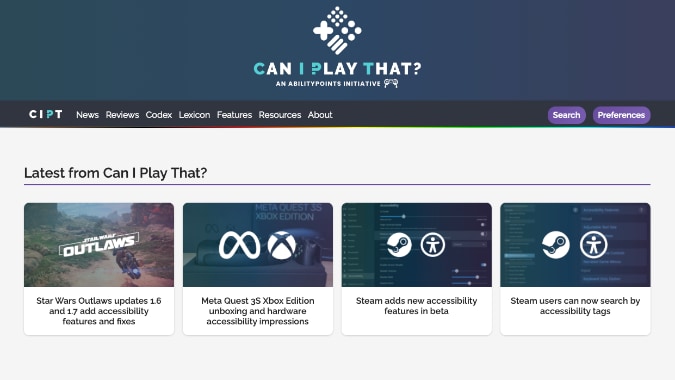
- Check a site like CanIPlayThat or Access-Ability which reviews games from an accessible point of view, and collects news about accessible game options. Able to Play (free login required) has a searchable database that lists accessibility options, and can filter games based on your needs.
- Is there a demo you can download before purchasing a full copy?
- Is there a stream of someone playing the game that lets you see the UI in action?
Please consider supporting our Patreon!
Join the Discussion
Blizzard Watch is a safe space for all readers. By leaving comments on this site you agree to follow our commenting and community guidelines.







