Blizzard previews much-needed updates to the Cooldown Manager
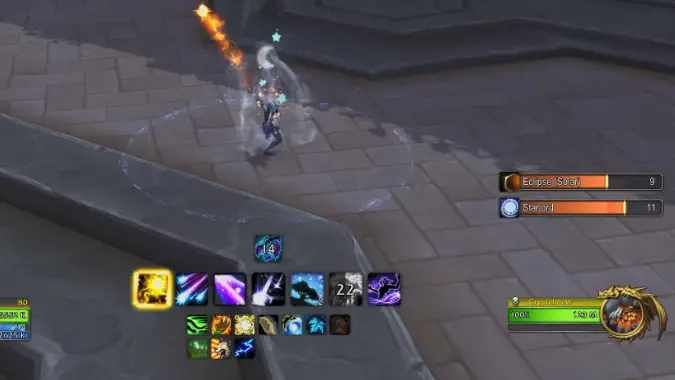
World of Warcraft may have added a fairly positively-rated set of combat assist features in patch 11.1.7, including the more hands-off Rotation Assist and the learn-to-play One-Button Rotation, but does anyone remember one of the central features of 11.1.5, the Cooldown Manager? Anyone? Anyone at all? If not, we can’t blame you: this feature, which had initially been touted as an in-game replacement for heavyweight addon WeakAuras when it came to notifying you about your class cooldowns, was pretty much dead on arrival due to the lack of customization and usability. Not only did it insist on placing every single cooldown available to your class on its bars in the order that Blizzard deemed correct, it also didn’t have basic functionality some specs need, like tracking debuff or buff durations. To add insult to injury, the player community had addons prepared nearly immediately to attempt to wrangle it into being usable — but the general consensus was a resounding “meh.”
Well, it seems that Blizzard is aware of how badly this feature flopped, and so they’re adding a number of new features to the Cooldown Manager that might make it not just usable, but — dare I say it — good. The core problems of the original Cooldown Manager can be summed up in one point, when you get down to it: Blizzard decided what was necessary and unnecessary information, and it couldn’t be changed in any way by the player. The result was something that didn’t suit many players’ needs, and couldn’t be adjusted to suit them.
Let’s see how Blizzard’s new changes help with that.
Organizing information the way you want
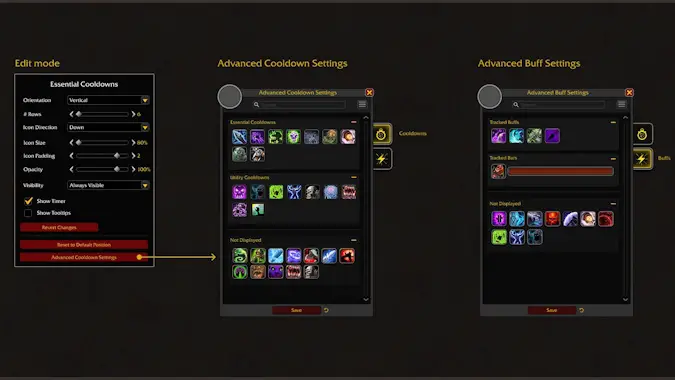
Part of the problem with the original Cooldown Manager was that it showed every cooldown available to your class in an arbitrary order decided by Blizzard, with no real differentiation between what was an important combat cooldown and what was just something utility or defensive that was now available. There was also a real lack of tracking buffs outside of very, very few abilities, and a near-inability to track debuffs, which was crucial information for certain specs.
Proposed changes to the Cooldown Manager will affect all of these in different ways:
- The display bars for the Cooldown Manager will now be in three different categories: Essential Cooldowns, Utility Cooldowns, and Not Shown. The two former categories are now separate bars, and the last one (as the name implies) causes those abilities to not be shown in the Cooldown Manager at all, allowing you to cut down on the visual noise.
- You can drag and drop items on the Cooldown Manager buffs so they’re in the order you want, rather than the order Blizzard arbitrarily decided (as best as I could tell, it was the order you got them leveling up — not terribly useful information, especially at 80!).
- When it comes to buff tracking, you similarly have three options: Icon, Bar, and Not Shown. Buffs tracked as icons will show you an icon when they’re active, while buffs shown as bars will give you a progress bar to indicate how much time they have left.
- In both cases, you can even include unlearned spells in any of these setups and they’ll hide or show appropriately whether or not you’re using them — think something like the Death Knight’s Soul Reaper talent, which isn’t always taken as a talent but when it is you probably want to know when it’s available; now you don’t have to fiddle with editing your Cooldown Manager setup to enable that.
Tracking more than just cooldowns: debuffs and big defensives
Anecdote time: when the first Cooldown Manager came out, I was in the midst of leveling a Frost Mage. I thought I’d give the Cooldown Manager a try, because this was basically the ideal situation: I was on a class and spec I didn’t know very well, and I needed to track some important cooldowns, buffs, and debuffs. I turned it on, discovered I couldn’t adjust anything, made a face at the screen, and tried it anyway — and that’s when I discovered that the Cooldown Manager did not display the duration, stack count, or even acknowledge the existence of Winter’s Chill, a fairly central debuff to how the spec works.
Now imagine playing something like an Affliction Warlock. Are you going to squint at the tiny boxes above a unit frame to make sure your DOTs aren’t falling off? To steal a quote from a famous anthropomorphic cartoon milkshake, I am thirty or forty years old and I do not need this. In the heat of combat I need that information to be front and center, not floating somewhere offscreen like enemy nameplates have a habit of doing. Luckily, the proposed changes to Cooldown Manager may alleviate this problem as well.
- You can track debuffs on your target in their own frame or on top of the regular Cooldown Manager frame — in the example shown, which is for Unholy Death Knight, the duration of Virulent Plague is laid over top of the icon for Epidemic, which is an odd choice, but serves to get the point across.
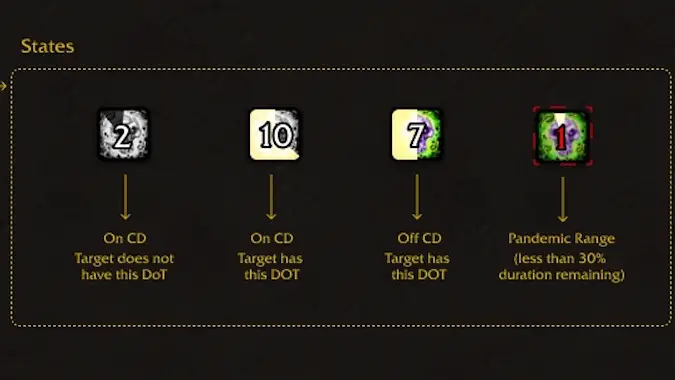
- There are then four visual states for the icon for the ability:
- A greyscale ability icon with a countdown indicates that the ability is on cooldown and the target does not have the associated debuff.
- A greyscale ability icon with a white “swipe” overlaid means the ability is on cooldown and the target does have the associated debuff.
- A colorful ability icon with the white “swipe” overlaid on top of it means the ability is off cooldown and the target does have the debuff.
- Perhaps most importantly of all four, there will be a special red version of the swipe and duration, as well as a red icon glow, indicating the debuff is in “pandemic” range — an otherwise completely invisible mechanic that is crucial to how many debuffs work, in that it indicates the range that you can refresh the debuff (typically 30% of max duration) without losing any ticks.
Additionally, and specifically of interest to tanks, there is an optional frame for displaying big defensive cooldowns that have been cast on you. This lets you see when things like Pain Suppression or Life Cocoon have been cast on you, so that you know how long you have to breathe easy before that cooldown runs out.
Sound, layout, profiles, and more customization options
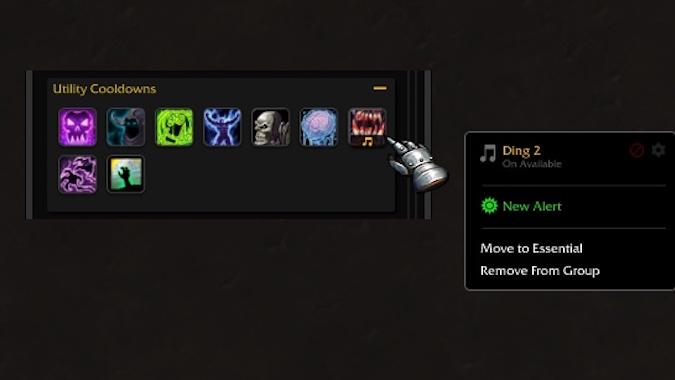
Other customizations are coming to the formerly inflexible Cooldown Manager. One of them that I know some players will enjoy are Sound Alerts — players will have access to a list of sounds to choose from that they can associate with abilities coming off cooldown. Sometimes in the heat of the moment these can even be better than visual alerts, because you don’t have to take your eyes off the fight, and they’re especially helpful as an accessibility feature for players with visual difficulties.
Blizzard is also looking at tying Cooldown Manager more tightly into the new and well-received Edit Mode for the user interface. Specifically, they want to allow greater flexibility in positioning parts of the Cooldown Manager — very important since it can now have multiple frames that you might want to position and size differently — as well as saving separate profiles for Cooldown Manager that you could swap between for different types of content. You might want to see different types of alerts prioritized differently for, say, raid versus Mythic+ versus PVP.
All these features honestly have me fairly excited — this is the level of flexibility that I think this feature needed in the first place to even come close to being usable, and if they deliver on these features in the way that they’ve described it then there’s a distinct possibility this becomes a very useful feature for many players in a way that it certainly isn’t now.
There’s no word on when these new features will be available, but they won’t be in patch 11.2 — so look for the updated Cooldown Manager to arrive in either patch 11.2.5 or 11.2.7.
Please consider supporting our Patreon!
Join the Discussion
Blizzard Watch is a safe space for all readers. By leaving comments on this site you agree to follow our commenting and community guidelines.







