The World of Warcraft achievement pane has a new ‘Back’ button…what’s it for?
 @Draygonia_42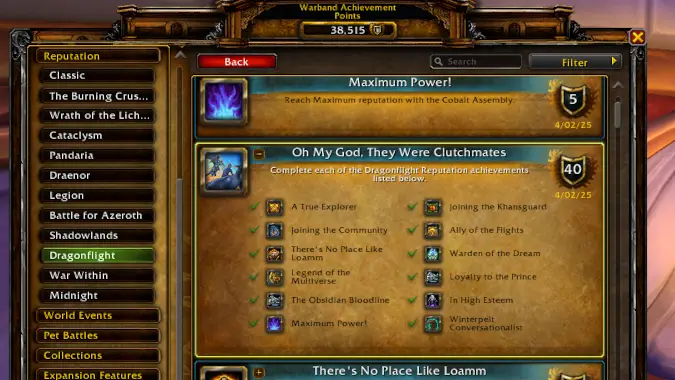
Here’s some good news for meticulous-minded achievement hunters: Midnight’s patch 12.1 has added a ‘Back’ button to the default achievement pane that allows for slightly easier navigation when browsing the requirements for certain big-ticket accomplishments. Read on to find out what this new button can (and cannot) do for you.
The main function of this new button (located on the top left of the default achievements pane) is to give players an easy way to explore the various sub-achievements necessary for a given meta-achievement without losing their place and having to click around the menus to find more information or return to their original place.
For example, you might have a few odds and ends to take care of to complete Worldsoul-Searching, the all-encompassing meta-achievement for The War Within. If you took a bit of a break during the end of the expansion and didn’t finish conquering K’aresh or helping the Hallowfall Arathi defend their home away from home, you might be missing Unraveled and Persevering and Owner of a Radiant Heart.
The achievement pane has always let you click on a component of a meta-achievement to jump to that component’s description and progress. Previously, however, there was no easy way to get back to the Woldsoul-Searching meta-achievement. You’d have to manually navigate back or type into the search bar to investigate the remainder of your tasks.
The new ‘Back’ button activates whenever you click on an achievement within an achievement. When looking at Worldsoul-Searching, clicking on Owner of a Radiant Heart brings you to the simple achievement that tracks your progress towards rank 10 renown with the Flame’s Radiance faction. Now you can use the ‘Back’ button to immediately return to Worldsoul-Searching and view its list of sub-achievements once again.
This feature is particularly useful for tangled nests of achievements that seem to be a case study in recursion like Storm Chaser. Defeating 200 empowered creatures in a Dragon Isles elemental storm nets you an achievement, but completing that for all four elements in a given zone is necessary for a meta-achievement.
Repeating for the other three Dragon Isles zones rewards the next level up, Storm Chaser. Yet that’s just part of the Into the Storm meta which is merely a piece of the Dragon Isles 10.0 world content meta which is but a fragment of the overarching Dragonflight meta-achievement. You can easily see how navigating both down and up the complex nest of tasks with the new ‘Back’ button comes in handy when planning where to head next on your quest to befriend the goodest mount in the game.
The new ‘Back’ button applies to any achievement with several individual sub-achievement components and not just the expansion-wide uber-achievements. While it will be most useful for broad, sweeping meta-achievements like What a Long, Strange Trip It’s Been, you can use it for dungeon and raid metas or even fairly straightforward ones like Midnight Delver.
What you can’t do is use this button the same way as the ‘Back’ function works in an internet browser. If you’re exploring the requirements for a nested set of achievements and you click over to the Delve achievements menu to see if you have any undiscovered chests for Gnarldor Island, then the button goes dark and you’re forced to navigate back to where you were or use the search function.
Of course, addons can make the whole conversation about this new feature moot (as is usually the case with incremental UI improvements). If you’ve been using an addon to streamline your achievement browsing experience for years, then this new feature probably won’t even be a blip on your radar. If you use the default achievement pane but have always been frustrated by the inability to return to the meta-achievement you just clicked away from, then this one’s for you.
Please consider supporting our Patreon!
Join the Discussion
Blizzard Watch is a safe space for all readers. By leaving comments on this site you agree to follow our commenting and community guidelines.