Midnight to bring Quality of Life improvements to the base game, but may block your favorite addons
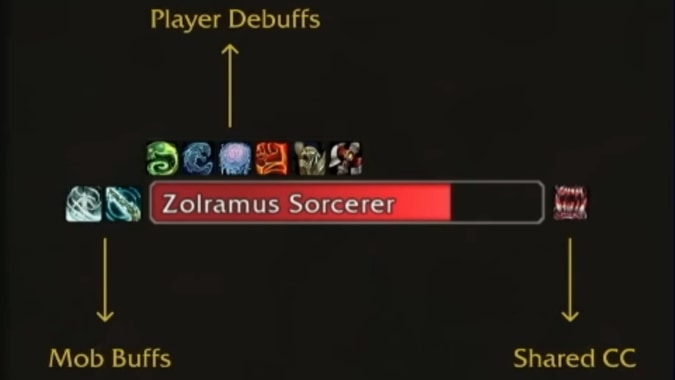
Information is still filtering out from Gamescom, but one thing we have seen from Blizzard’s Developer Deep Dive Panel was an update on their push to eliminate the need for third party combat addons. Their stated purpose for doing this is to put all players on a level playfield instead of having an additional learning curve of needing to know what addons you may need and where to get them, or how to set them up. In previous statements, Ion Hazzikostas has said that they don’t plan to block addons entirely, and that they support the ability to customize the look and feel of the UI, but that they want to reduce or entirely eliminate the use of third-party addons that make decisions or provide guidance to players during combat.
When we saw the first iteration of the Cooldown Manager in Patch 11.1.5, we thought this would be a process that would be delivered over multiple expansions and a long period of time, but with Patch 11.1.7 they came out with an updated version with substantial improvements and shows how committed they are to push these changes and listen to feedback.
At Gamescom we saw brief glimpses of the next three systems they planned to introduce: a Damage Meter, Nameplate updates, and Boss Ability Alerts. They have since released a series of blog posts that included one describing the UI updates, will very little new information. At this stage all we have a few screenshots but haven’t seen them in use yet. We don’t know what the options in the menus will be or how customizable they will be.
In the original announcement of their intent to replace and block external combat addons Ion said that they intended to continue to allow addons to change the appearance of the UI, but we haven’t seen how this will work with these new features yet. The blog post states that they have “many more” UI updates planned, both at launch of Midnight and beyond, so we will have to wait and see what those features will be. Until we see these on a public facing test realm, we won’t really know how configurable they will be and how well they will function — but this is what we know so far.
Nameplate Update
What addons does this replace? Plater Nameplates, BetterBlizzPlates, Threat Plates, KUI Nameplates
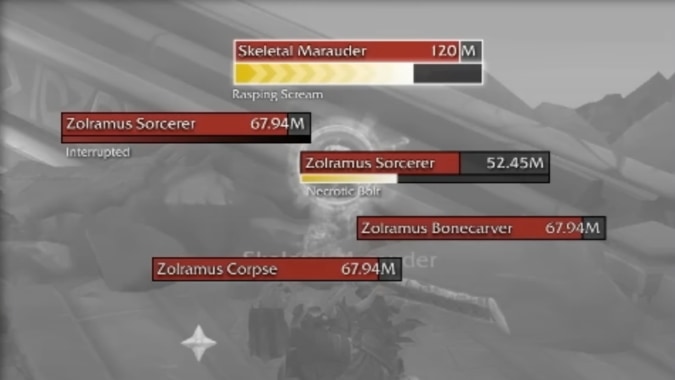
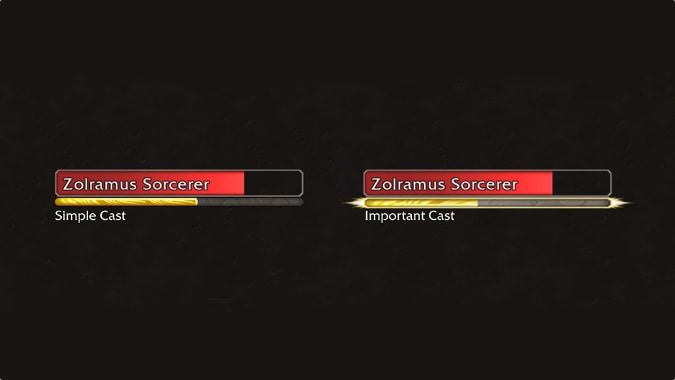
What do we know? Among the features Ion mentioned during the presentation, the ability to customize the way buffs and debuffs display on the mod nameplates, clearly indicate mobs casting abilities, and highlighting lethal casts that should be an interrupt priority.
What can we infer from the screenshots? Not mentioned in the overview, but one of the options listed in the shown configuration window was Aggro Display — threat management was one of the original core addons that all raiders installed. The interface shows options to change the size of the nameplates, there is a style dropdown suggesting a number of different cosmetic appearance options. In that same way that the current built in UI lets you choose from a number of display options for unit frames, you can choose to display some information about the mobs, including the health percentage and health value. There is an option to choose some mob families to display simplified nameplates only, such as friendly targets or minions.
What don’t we know yet? We don’t know if it will be possible to customize the buff/debuff display on mobs. For castable buffs/debuffs, we don’t know whether we will what we have cast, or if we see all of them whether it will highlight the ones we have cast — so you can see when a DOT will expire for example. It’s unclear whether it will highlight when an enemy mob has dropped into the execute range.
Damage Meter Replacement
What addons does this replace? Details, Skada, Recount, Warcraft Logs with live logging
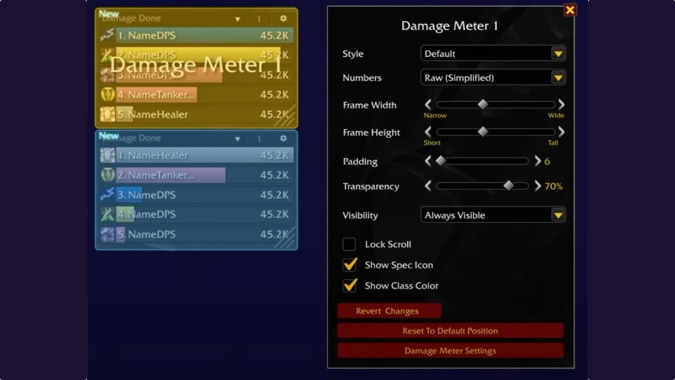
What do we know? Ion has said previously that they will track damage and healing, the screen shots we have seen only showed the damage configuration. At Gamescom it was highlighted that these will use server-side authoritative data — so it will accurately track regardless of range or phase for fights where you aren’t all in a short range of each other for the entire combat.
What can we infer from the screenshots? The screenshot shown at Gamescom had a fairly minimal set of configuration options when compared to a tool like Details. Again we can choose a style, though only the “Default” version was shown as an option. It shows a dropdown menu for “Numbers” with the option “Raw (Simplified)” selected, suggesting some kind of weighted comparison option, maybe for classes like Evoker if you have an Augmentation evoker in raid. You can choose from a number of options for when the addon will be visible, but we can only see “Always Visible.” You can choose to display class colors and a class icon which is specialization specific.
What don’t we know yet? While Ion has previously mentioned a Healing meter, he didn’t mention it at Gamescom. Other meters I frequently rely on as a raid leader is a Death Recap and the time the death occurred (did a lot of people die to the same ability for example), or an interrupt tracker to see who is interrupting key abilities — or missing their assigned interrupt. They have said they don’t want to have cooldown information shared across the raid, but we don’t know if they mean things like the 3 minute burst cooldowns, or things like how many battle resurrections the raid has available right now and when will the next one be available.
Boss Alerts Replacement
What addons does this replace? Deadly Boss Mods, BigWigs Encounter Tools, Ability Timeline (Boss Mods)
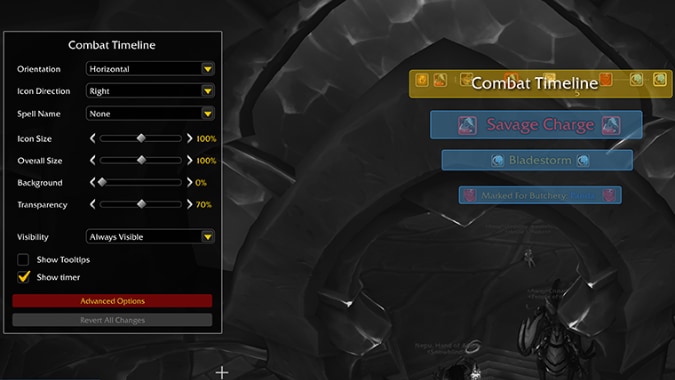
What do we know? We got less detail on this component than the others; all we know is it will give us information on the timing of key boss abilities. From the configuration frame it looks like we will be able to choose whether the timeline is a horizontal or vertical element, and whether it displays spell names and the direction the text will be positioned.
What can we infer from the screenshots? It looks like abilities will be announced using the build in scrolling combat text function, and there will be a timeline similar to the popular “Raid Ability Timeline” Weak Aura that displays information from your Boss Mod of choice. This timeline shows you the queue of upcoming abilities, with a countdown in seconds and a callout when they are at 5 seconds or less. Some abilities are shown as red, implying they are significant in a way similar to the nameplates showing abilities that will wipe the group if not interrupted, but we don’t yet know what criteria is used to display these abilities. The provided screenshot shows a tantalizing “Advanced Options” button which may offer more choices in what abilities are displayed and the time slice shown.
What don’t we know yet? There has been previous mentions of possible audio alerts — it’s not clear if they would apply to abilities in the Boss Alerts in addition to the Cooldown Manager. All the icons were in the same format, but it would be a good UX option to be able to show casts that are for tanks to respond to differently to those which Healers may need to use a big cooldown, or abilities that would trigger a DPS burst window. Having different icon shapes or a border color for something to avoid, unavoidable damage, a tank swap, or the boss being vulnerable and taking extra damage would be useful. We also have to assume that information about the duration of a channeled ability would be tracked on the nameplate, as there is no indication that it would be shown here. Another feature of the current Boss Mods is displaying when a boss ability has come off cooldown, meaning it can now be cast — but it doesn’t have a fixed cast sequence, we don’t know if this will still be an encounter design element going forward, and whether the new combat timeline will display the possible cast window.
Personal Resource Display Update
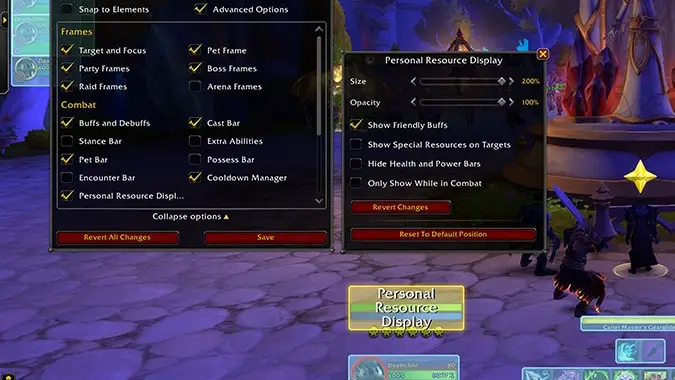
This wasn’t mentioned in the developer chat, but was included in the recent blog post. Configuring this option appears to have moved from the Option menu to the HUD Edit Mode window. It seems to have a small number of additional features, and no longer appears to default to being linked to the onscreen character model, but the character unit frame instead. But this may be a positioning preferred by the person who took the screenshot, and not the new default position.
Pre-release features are not final
While this is the information that was discussed during the System Download panel, we should note these are pre-alpha versions of the feature, and it may change between now and release.
If you want to test out this feature you can either sign up for the Midnight beta for a chance to be randomly selected to participate in the public beta testing, or if you preorder the Epic Edition of the Midnight Expansion Pack, you will be automatically granted access at some point during the public beta test.
Please consider supporting our Patreon!
Join the Discussion
Blizzard Watch is a safe space for all readers. By leaving comments on this site you agree to follow our commenting and community guidelines.







