How to make furniture you can sit on in Player Housing
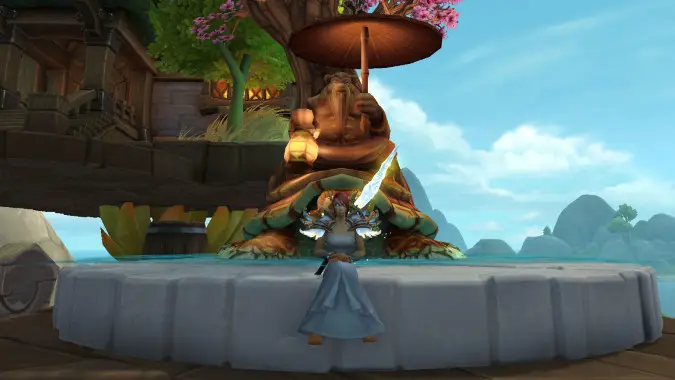
A very cool feature that players quickly discovered with Advanced Mode in World of Warcraft player housing is that you have a lot of control over the size and placement of objects, and with some careful positioning, you’re able to make furniture (or any sort of “edge” really) that you can sit on. A box? A chest? A barrel? A fountain or random ledge? You can make it “sittable” and have your character right click on it to express all of their comfort and relaxation, even if that particular piece of decor was not made for it.
The trick is simple: the game already features several stool-like objects, such as Small Wooden Stool, which you probably already have or can easily obtain. These stools can be interacted with to make your character sit, and you can place them inside other objects by moving them in advanced mode. You can put them inside another piece of furniture — the edge of a fountain, the side of a bed, a deck outside your house, or a number of other things you can think of — in order to sit on them.
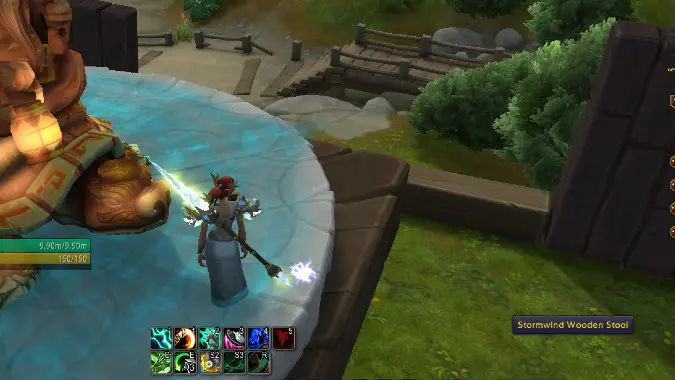
First, place your chosen stool near the object you want your characters to be able to sit on. A good way to do this is to place it exactly on top of the other object.
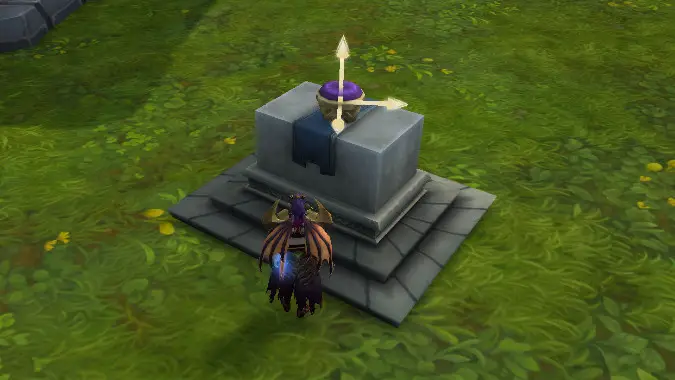
Position the stool near the edge of the object, and then use the vertical arrow to bring it down until it just disappears inside the other object. Once you do that, leave House Edit mode so you’re in full control of your character again.
Once you hover your mouse cursor over the object, you should see that it can now be interacted with in the position where the stool is. Right click and your character will sit on the the invisible stool, giving the illusion that they’re sitting on the object that hides the stool.
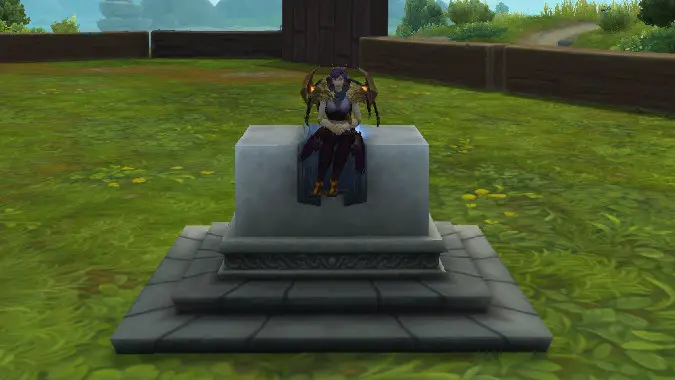
It’s as simple as that, but it’s a super neat trick that can really give you many new possibilities. Have fun with this one!
Please consider supporting our Patreon!
Join the Discussion
Blizzard Watch is a safe space for all readers. By leaving comments on this site you agree to follow our commenting and community guidelines.







