How to make your house float in WoW Player Housing
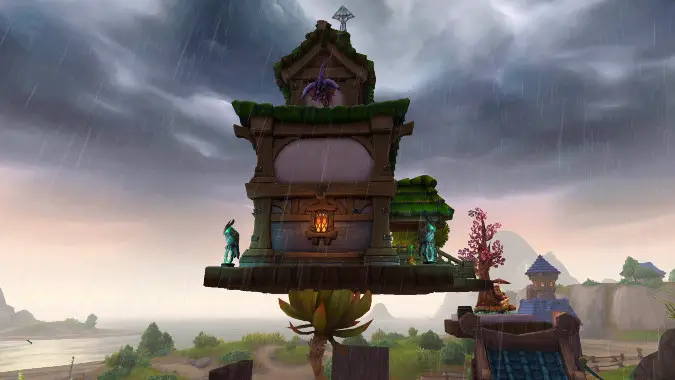
The latest trend players have adopted with the player housing system in World of Warcraft is to make their houses float up in the air. This was a bug initially: houses were not intended to be lifted up this way, and Blizzard had deliberately removed the arrow that would enable this vertical movement from advanced mode. But clever players found ways to access that vertical axis for their houses anyway, and soon, images and videos of floating houses started popping up all over social media.
“Fun detected,” many said. “Blizzard will nerf this.” Except they didn’t! Blizzard officially allowed players to keep their floating houses despite some big concerns such as the underside of houses not even having been modeled — absolute proof that this was not originally intended to happen, but Blizzard was willing to make a big exception. Good on you, Mr. Blizzard!
Surely you must be asking by now: how do I make my house float if the arrow to lift it up vertically doesn’t exist? Keep reading, for we’re about to tell you.
How do I make my house float (or fly!) in World of Warcraft Player Housing?
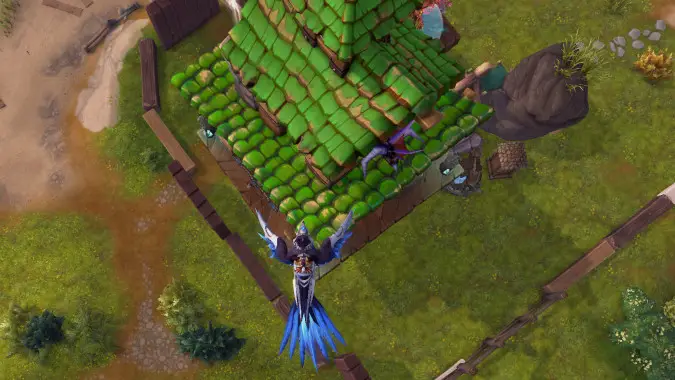
If your House does not already show the arrow that allows it to move vertically, you’ll want to use this “trick” of flying up and looking at your house from the top.
First of all: Steady Flight makes this much easier. That’s the old style of flying where can just hover in the air on your mounts. So you might want to hit the Switch Flight Style button on your Mount tab (at the top) to switch to Steady Flight, and then mount up.
Position your character diagonally, at one of the “corners” of your house. Fly up on your mount. Then, enter your Edit House mode, and activate Advanced Mode, under the Move mode (which shows three arrows when you click an object so you can move them with precision).
Then, angle your camera so that one of the existing arrows is “inside” your character, and pointing up. It doesn’t matter which arrow it is: this works on the arrows that would only move your house horizontally, as long as you position and angle it like that.
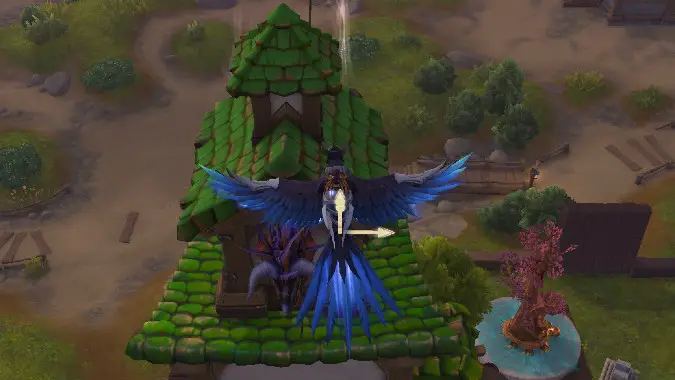
When you click that arrow and move it up, your cursor should fixate on the vertical arrow instead, and move your house up.
It sounds weird, I know. But in that recent blue post, Blizzard did say that they have added controls to make moving your house up/down easier, and this positioning trick is just one of the ways clever players have found to access the “hidden” vertical arrow.
There are other ways, though. Certain plots have slopes or rocks that you can drag your house to, moving it on top of them. After you do that, the vertical arrow should usually appear, giving you freedom to move your house further up if you want to.
So there you have it, folks. The controls aren’t fully implemented in the game yet, but although they’re sort of “hidden,” Blizzard has given players some limited access to the vertical arrow that allows them to move their house along the Z axis, sending it floating up in the sky.
But do keep in mind that there’s nothing underneath the house! You might want to cover it up with some platforms or something similar. Either way, we hope your creativity flows from this new feature!
Please consider supporting our Patreon!
Join the Discussion
Blizzard Watch is a safe space for all readers. By leaving comments on this site you agree to follow our commenting and community guidelines.







