WoW patch 12.1 will let you attach your Warcraft guild to your Discord server… if you want to take the risk
 @lizexmachina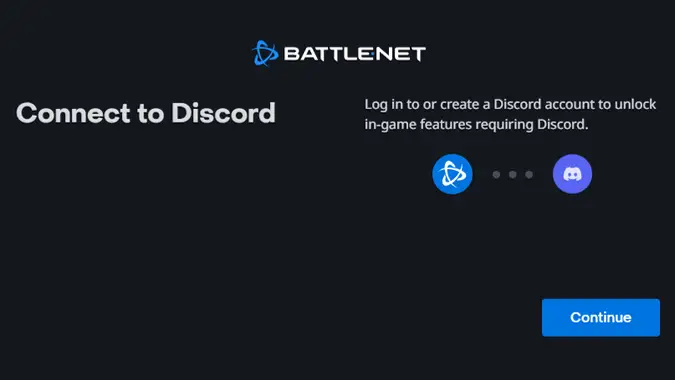
World of Warcraft patch 12.1 has brought the standard set of exciting new content for players, but one thing no one had on their bingo card was in-game access to Discord chat. While we do miss being able to chat in game when we’re offline, a feature that used to be part of the now-defunct WoW companion app, most guilds coordinate via Discord, which is easily accessible from anywhere — but until now, it didn’t have any kind of integrated access to in-game chat. Now that’s changed, and you use Discord to directly talk in guild chat and vice versa.
You might think we would meet this addition with excitement, but you can only see so many compromised Discord accounts sending a wrecking ball through communities before you become wary of linking your Battle.net and Discord accounts. It’s safe to say we have some serious concerns about security around this integration. Let’s review the important points about the new connection feature between your Battle.net and Discord accounts to chat with your guild, including how to set it up for both your guild Discord server and your accounts, and why we think it may not be a good idea.
Call us paranoid, but we have some security concerns
First off, let’s clarify what this feature gives you. Blizzard describes it as “allowing you to speak with your guildmates both in and out of the game…no matter where they are.” The integration either combines messages from Discord in with your in-game guild chat (accessed via /guild), or creates its own dedicated Discord chat under your guild, accessed with /discord. On paper, this originally sounded really cool — I loved being able to catch up with my guild when the WoW companion app still existed.
Unfortunately, the IT security-conscious voice in my head (“sharply” honed after being bludgeoned against end users for 20+ years in the IT industry) is also screaming bloody murder. After all, it was not so long ago that a big social engineering attack hit Discord servers; it even impacted one of our writers. So, what would happen if you set this up and then one of your accounts was compromised? First, either has the potential for some serious spam in that most sacred of spaces — guild chat. Even if you don’t connect (or disconnect) your Discord account account from Battle.net, Discord will still show messages from others with their integration enabled, so cross your fingers for the password strength of your guildies.
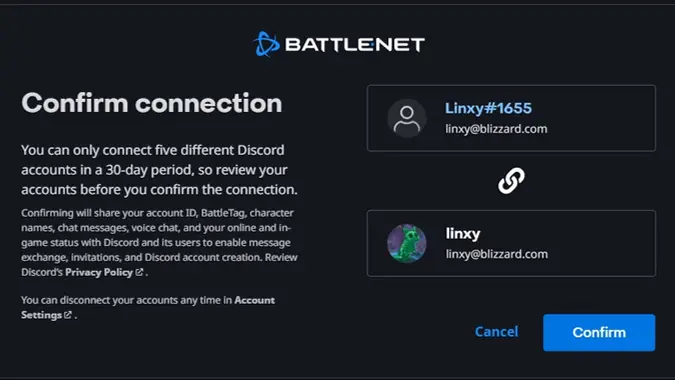
But this also means additional information is shared between Battle.net and Discord — during setup, you confirm that you are sharing the following information between Discord / Discord users and Battle.net:
- Your Discord account ID
- Battle Tag
- Character names
- Chat messages
- Voice chat
- Your online and in-game status
That earthquake you just felt was every Moonguard player quaking in their boots. Why don’t we specify guild chat messages, instead of chat messages? Why is voice chat being shared? Yes, Discord’s Privacy Policy is referenced, but it wasn’t so long ago that Discord was preparing to force ID validation on its users. Both Blizzard and Discord are corporations — privacy policies change, and this integration hands Discord a lot of personal data. Even if it’s shared with the best of intentions, sharing it at all puts your personal information at greater risk.
Connections between platforms also open up additional exploit paths. For example, if Discord or Battle.net suddenly had an undiscovered (also known as zero-day) vulnerability, the other partner bears increased risk to their systems because of the connection. These types of integrations are incredibly complex because it’s not just about an encrypted connection — you, as partner A, are dependent on partner B’s security compliance and monitoring, as they are dependent on yours. Data exchanges across corporate boundaries have a different set of risks, based on each partner; just because you’ve done it 500 times does not mean round 501 will be any safer.
How to set up Discord integration for WoW players
Now, if you’d like to proceed forward with this configuration, the account setup itself is fairly simple:
- Log into your Discord account and World of Warcraft.
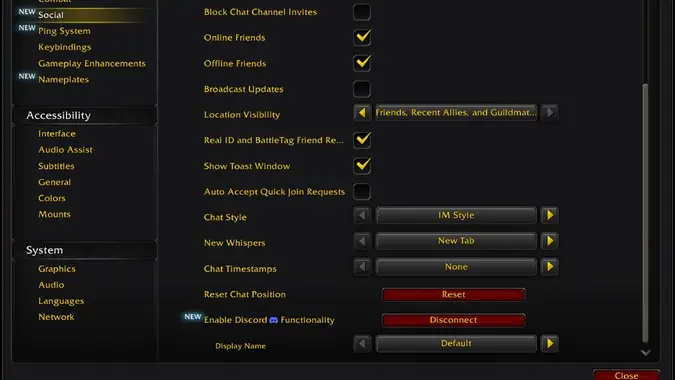
- In game, open the Game Menu by hitting Escape, and select Options. Under Social, click the Connect button to Enable Discord Functionality.
- Go through the additional prompts to log into your Discord account to unlock the new integration and confirm the connection between the two accounts (this needs to happen in both the Battle.Net prompt and in Discord).
Once you link your account as a user, you can use the new “Display Name” setting under the Social tab to define what WoW character on your account displays when you message your guild from Discord. The Default option is the same as the Last Online Character Name one, which uses the last online character for your Battle.net account in guild and distinguishes the message source with a Discord icon. However, you can also set it to use your Discord account by selecting the Discord Global Name choice (clearly indicating that you are not in-game right now). That’s it for regular Discord users/players!
How to set up Discord integration for WoW guild leaders
If you’re a lucky Guild Leader or Officer and Discord Server Administrator with access to Manage Channels, you have extra steps that must be completed before anyone in the guild can see guild chat in Discord. You have to complete the following to set up the connection between your guild in-game and its Discord server after you connect your accounts:
- Open your Guild UI, and under Roster select Guild Settings.
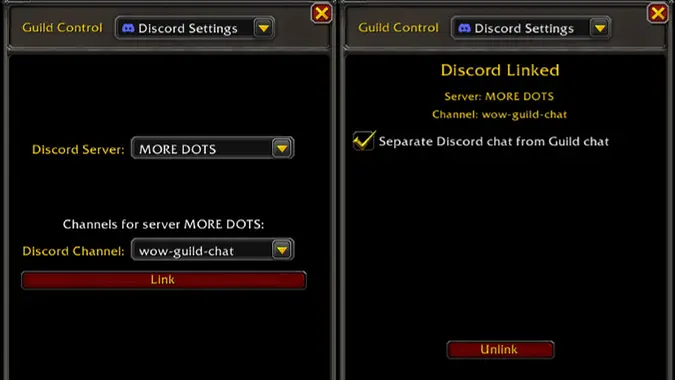
- Under the Guild Control dropdown, select Discord Settings and find your guild server that you would like to link in the Discord Server dropdown.
- Select the text Discord channel you would like connected to your guild chat and click the Link button.
From here, you have the option to change how chat is configured. You can opt to have chat go into your main /guild chat channel (combining Discord chatter with your in-game guild chatter), or its own dedicated /discord channel (isolating it from your normal /guild chat).
For better or for worse, if you choose to connect your guild’s Discord server to WoW you open up functionality that we haven’t had since the death of the dedicated companion app, where people can chat with friends who are in game from anywhere they can access the Discord app or website. But we really do wonder if it’s worth the security cost. After all, Blizzard and Discord may have some top-tier Security Operations Centers (SOCs), but security only as strong as your weakest component… or the guild member who clicked on a seemingly innocuous link and had their Discord account compromised.
Please consider supporting our Patreon!
Join the Discussion
Blizzard Watch is a safe space for all readers. By leaving comments on this site you agree to follow our commenting and community guidelines.